

If you’re completely new to AI assistants, this claude ai beginner guide 2026 will help you understand exactly what Claude is, how it works, and how to start using it confidently.
Updated for 2026, this guide covers the latest Claude features, including Projects, Memory, and the current model family in simple, beginner-friendly language.
What Is Claude AI? A Simple Explanation for Beginners
Claude is an AI assistant created to help people write, learn, research, organize information, and answer questions using natural language.
Instead of requiring technical skills or coding knowledge, you simply type your request in plain English and Claude responds conversationally.
Claude is designed to be helpful, honest, and safety-focused, making it approachable for students, professionals, and everyday users.
Who Created Claude?
Claude is developed by Anthropic, an AI company focused on building helpful and reliable AI systems.
One thing that makes Claude different is its use of Constitutional AI. In simple terms, this means Claude is trained to follow a set of principles that encourage safer and more trustworthy responses.
How to Access Claude AI in 2026
You can use Claude through several platforms:
- Web browser
- Desktop app
- Mobile app
Signing Up on the Web
- Visit the Claude website.
- Create an account.
- Verify your email.
- Start a new conversation.
Desktop Applications
Claude offers desktop applications for Windows and Mac users who prefer working outside a browser.
Mobile Apps
Claude is also available on mobile devices, allowing you to continue conversations wherever you are.
Age and Availability Requirements
Availability and age requirements may vary by region, so check the latest information before creating an account.
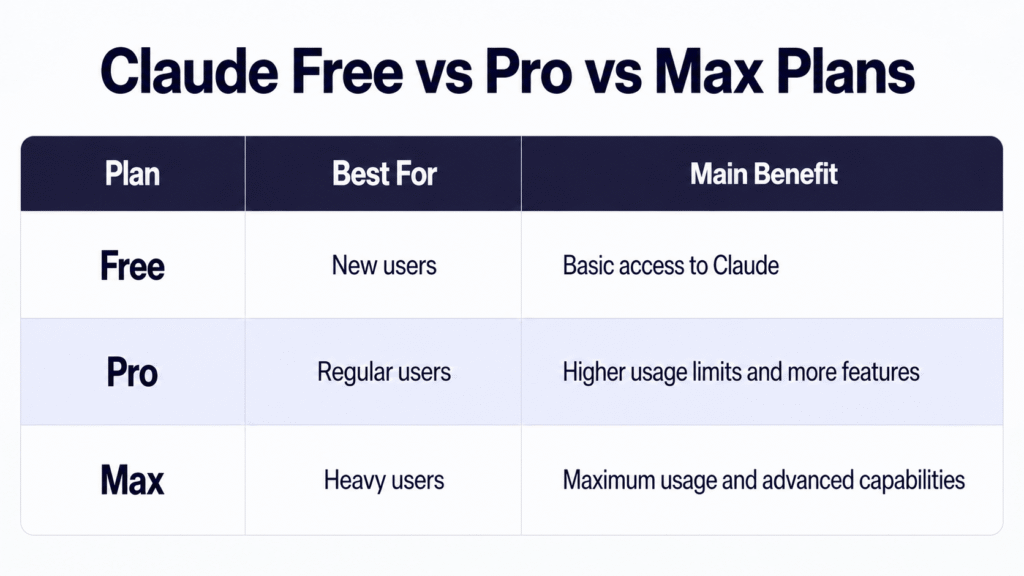
Claude Free vs Pro vs Max Plans
What You Get on the Free Plan
The free plan is enough for most beginners who want to explore Claude and learn how it works.
What Pro Adds
The Pro plan provides higher usage allowances and access to additional capabilities.
When to Consider Max
The Max plan is designed for people who use Claude extensively throughout the day.
Claude’s AI Models Explained: Haiku, Sonnet, and Opus
Understanding the models is an important part of this claude ai beginner guide 2026.
Claude Haiku
The fastest and lightest model for quick tasks and simple questions.
Claude Sonnet
A balanced option that works well for writing, research, and everyday use.
Claude Opus
The most powerful model for complex reasoning and demanding projects.
How to Choose a Model
If you’re new to Claude, Sonnet is usually the easiest place to start because it balances speed and quality.
How to Get Started With Claude AI: Step by Step
- Create your account.
- Open a new chat.
- Choose a model.
- Ask a simple question.
- Refine your prompt if needed.
- Explore features like Projects and Memory.
- Continue experimenting.
How to Write Your First Prompt
You don’t need special commands.
Treat Claude like a knowledgeable colleague and explain exactly what you need.
Good Prompt Example
“Explain photosynthesis in simple language for a high school student.”
Better Prompt Example
“Explain photosynthesis in simple language for a high school student and provide three examples.”
If Claude Misses the Answer
Ask follow-up questions.
Examples:
- Can you simplify this?
- Can you provide examples?
- Can you rewrite it in bullet points?
Learning this prompt-refinement process is one of the most useful skills in this claude ai beginner guide 2026.
What Can Claude Actually Do?
Claude can help with many everyday tasks:
- Writing emails
- Summarizing documents
- Brainstorming ideas
- Explaining difficult topics
- Organizing plans
- Creating study notes
- Improving writing
- Assisting with light coding tasks
Key Features Every Beginner Should Know
Claude Projects
Projects are organized workspaces that help you keep related conversations and materials together.
Claude Memory
Memory allows Claude to remember certain preferences and information across conversations.
Claude Artifacts
Artifacts are interactive outputs generated during conversations, such as documents, code, or structured content.
Style Settings
Claude can adapt its writing style to better match the tone you prefer.
Your First Hour With Claude
A simple beginner plan:
First 15 Minutes
- Create your account.
- Ask simple questions.
Next 15 Minutes
- Experiment with different prompts.
Next 15 Minutes
- Create your first Project.
Final 15 Minutes
- Explore Memory and Artifacts.
This approach helps beginners become comfortable with Claude quickly.
What Claude Can’t Do
Claude is powerful, but it has limitations.
It May Not Know Recent Events
Claude may not always have access to the latest information.
It Can Make Mistakes
Like all AI systems, Claude can occasionally provide inaccurate information.
Some Requests May Be Declined
Claude includes safety protections that limit certain responses.
How to Use Claude Responsibly and Safely
To get the best results:
- Verify important information.
- Avoid sharing sensitive personal data.
- Use Claude as an assistant, not as a replacement for professional advice.
- Review outputs before using them in important situations.
Frequently Asked Questions
Yes. Claude offers a free plan that allows beginners to explore the platform before upgrading.
No. Claude is designed for everyday users and requires no coding knowledge.
Writing, studying, brainstorming, organizing information, and learning new topics.
Claude offers Free, Pro, and Max plans, with additional options for organizations.
Claude includes Memory features that can remember certain preferences and information.
Yes. Many students use Claude for explanations, summaries, and study assistance.
Next Steps
Now that you’ve completed this claude ai beginner guide 2026, the best way to learn is through practice.
Create an account, ask simple questions, experiment with prompts, and gradually explore Projects, Memory, and other features. The more you use Claude, the more valuable it becomes as your everyday AI assistant.